| Clean Architecture Toolkit for .NET | |||||
|
Clean Architecture Toolkit is a clean, modular architecture foundation for .NET applications. It embraces SOLID principles and focuses on maintainability, testability, and scalability through clear boundaries and pluggable design. |

|
||||
|
| HOME | MODULE OVERVIEW | DEMO | |
|||||
Demo plan
This is the working plan for the demo application.
It replaces the todo demo with a small bookshop.
Contents
- The idea
- Decisions and open questions
- Services
- Architecture
- Where each module fits
- Technology
- Data models
- Roadmap
- Next steps
- Interesting documentation
The idea
A todo app is too limited to show every module.
A bookshop is easy to understand, and it gives every current and future module a natural place.
Start small. Catalog plus a basic Orders service already covers most of the current modules.
Decisions and open questions
Decided
| Topic | Decision |
|---|---|
| Client | React with TypeScript, built with Vite. |
| Hosting | Aspire runs everything: the services, the React app, SQL Server in a container and later the Service Bus emulator. |
| Database | SQL Server in a container, started by the Aspire AppHost. One database per service. |
| Messaging | The Azure Service Bus emulator, started by the AppHost. |
| ServiceDefaults | The demo uses the Aspire ServiceDefaults project. |
| Code first or database first | Catalog and Orders are code first. Inventory is database first. |
| Inventory schema | A folder with SQL scripts, applied by the AppHost. |
| Book and order references | Orders owns its database, so OrderLine uses BookId. Inventory does not own its database, so it identifies a book by Isbn and an order by OrderNumber. |
| Order number | Unique, created when the order is placed, in the format YYYYMMDD-0000. The counter restarts at 0001 every day. The date is the UTC date. |
| Order number counter | A DailyOrderCounter table with one row per UTC day. The service increases the row in one atomic SQL statement, in the same transaction that saves the order. See Order number counter. |
| Authentication | OpenID Connect with Keycloak, started by the AppHost with an imported realm and seeded users. See Authentication and authorization. |
| Authorization | The gateway and the services validate the same JWT. Services authorize on the claims. Catalog reads are public, Orders needs a login. |
| Customers | Customer stays in Orders, with an ExternalId that holds the sub claim of the token. No customer endpoints. PlaceOrder finds or creates the customer from the token. |
| Current user | The business logic only knows ICurrentUser. Orders is built against it first, with a development stub. Keycloak and the real implementation come with the gateway. The interface moves to Cat.Authorization.Abstractions and is renamed ICatUser when that project exists. Until then the demo keeps ICurrentUser. See Cat.Authorization.md. |
| Scope of the first Orders build | Core plus FluentWorkflows and EventAggregators. The place order workflow runs with IStockReservation and IPaymentProvider, both with a fake behind them. Orders keeps its state in the order status. A saga style payment over messages comes later, see Cat.Sagas.md. |
| Unit price | The client sends only BookId and Quantity. Orders asks IPriceProvider for the current price of each book and stores it in OrderLine.UnitPrice. Under the AppHost, CatalogPriceProvider, a plain HttpClient implementation, calls the price endpoint of Catalog. Without the AppHost a fake answers. The Cat.Api.Client module replaces it in the future. See DemoAspire.md. |
| Payment provider | A separate demo service, Cat.Demo.PaymentService, with no database. Orders connects to it over HTTP, so retry and circuit breaker have a real call to protect. The service takes payments by the same rules as FakePaymentProvider and can be made to fail on purpose. A setting of the service switches the failures on, not a header or a query value of the call. The in-process FakePaymentProvider stays for a plain dotnet run, the way FakePriceProvider does. The box in the architecture drawing stays hatched until the service exists. |
| SQL Server mode | The AppHost supports two modes, switched by a setting: a SQL Server container, or an existing instance through connection strings. Docker is not required to run the demo. Both modes are built, Existing first. See DemoAspire.md. |
| Counter cleanup | The CleanUpOrderCounters service request deletes the rows of earlier days and creates the row of today. The Scheduler will run it nightly. Until the Scheduler exists, a development only endpoint triggers it. |
| Currency | One currency, euro, to keep the demo simple. |
| Sharing contracts | A choice per connection, as the root readme describes. React client to gateway: not shared. Orders to Catalog: not shared. A later service to service call: shared, so the demo shows both. See Sharing contracts. |
| API gateway | It is the API gateway from the Application Architecture chapter of the root readme. It becomes a module, Cat.Api.Gateway. See Cat.Api.Gateway.md. |
| Notifications storage | Decided once the Scheduling module is designed. |
| Todo demo | Cat.Demo.TodoService is removed. Catalog is the first service of this plan. |
| First service | Catalog is built first, then Orders. |
Open
- Roadmap order. Do you confirm the order of the roadmap? In particular: the gateway and login before the React client, and Inventory before messaging.
- Gateway technology. The gateway is the module
Cat.Api.Gateway. Is it built on YARP or on a router of our own, and does the demo gateway use the module from the start? See the open questions of Cat.Api.Gateway.md. - Stock call. Until messaging exists, Orders reserves stock with an HTTP call to Inventory. Does that call share the
Contractsof Inventory? It is the candidate for the shared choice in Sharing contracts. - Resilience in the demo. Aspire ServiceDefaults says the demo does not use
Cat.Resilience, because ServiceDefaults covers it. The roadmap shows the resilience story with the ServiceDefaults handler. When does the demo useCat.Resilience: never, or in a part that runs without Aspire? - Payment service failures. Which failures can the setting switch on: latency, a share of random errors, a full outage? Which values does it take?
- Unreachable payment service. What does the place order step do when the payment service times out or the circuit is open? A failed order with its own error code, or something else?
- Double charge. A retried payment call may charge twice. Does the call carry an idempotency key, for example the order number, and does the service remember the keys?
- Port and wiring. Which fixed port does the payment service get, and how does Orders learn its address? The price provider uses service discovery,
services:catalog:*.
Services
| Service | Job | Built |
|---|---|---|
| Catalog | Books, categories and prices. Mostly reads, with a bit of admin. | Code first |
| Orders | Customers place and track orders. This is the main service. | Code first |
| Inventory | Tracks stock and reserves it when an order comes in. | Database first |
| Notifications | Sends the order confirmed and order shipped messages. Runs the scheduled jobs. | Not decided yet |
Architecture
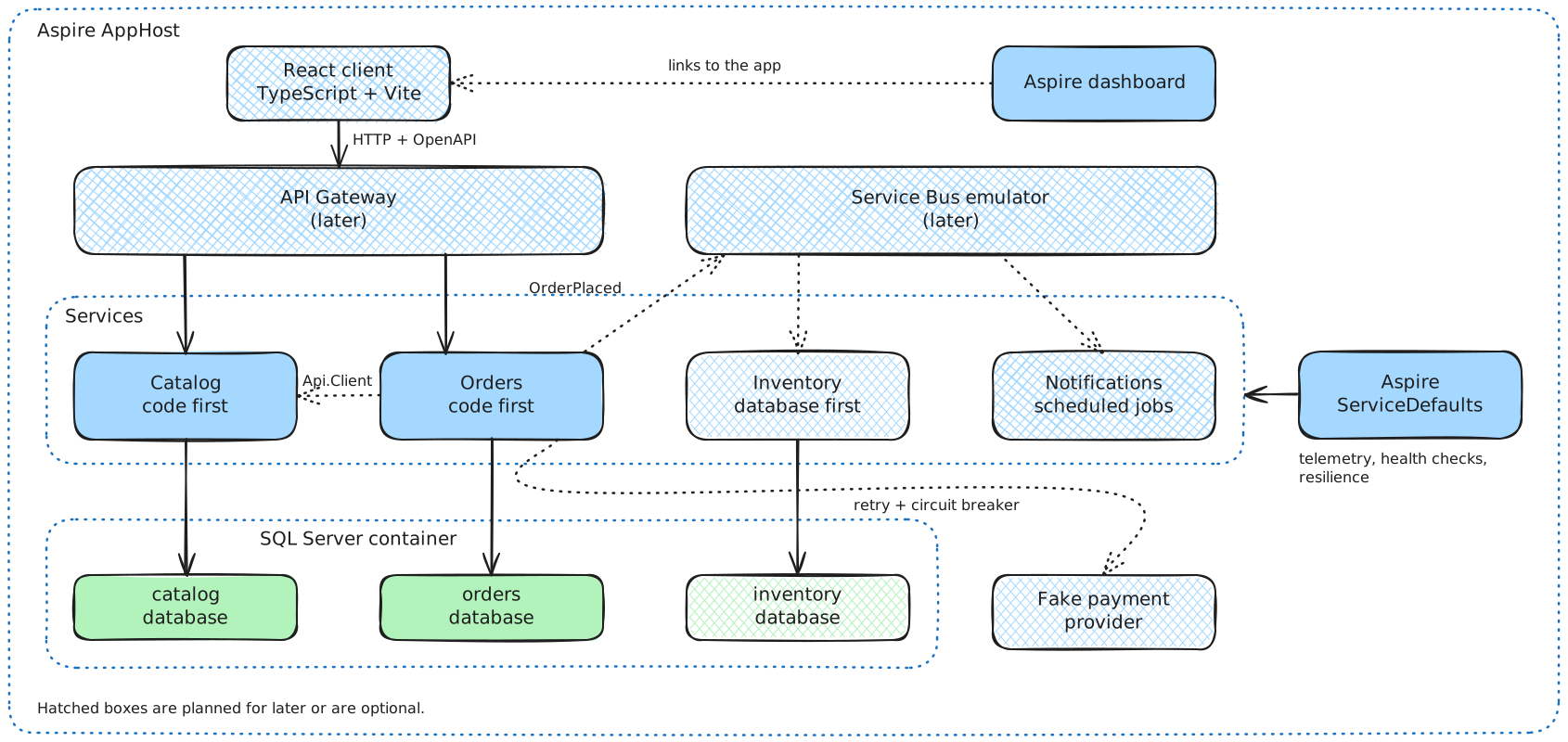
- Clients only talk to the API gateway. The gateway is planned for later.
- Services call each other through the gateway, and publish messages on the Service Bus.
- Every service has its own database in the SQL Server container.
- Aspire ServiceDefaults gives every service telemetry, health checks and resilience.
- Hatched boxes in the drawing are planned for later or are optional.
Where each module fits
Current modules
| Module | Demonstrated by |
|---|---|
| Commands, Queries, ServiceRequests | PlaceOrder, CancelOrder, GetOrder, BookSearch |
| Responses, Validators | Validating an order. Stock and payment failures come back as error responses. |
| Decorators | Logging, validation and tracing on every request. |
| Minimal.Api | The endpoints of each service. |
| FluentWorkflows | The place order process: validate, reserve stock, take payment, confirm. It has an if for out of stock and a foreach over the order lines. |
| EventAggregators | In-process events inside Orders, such as OrderConfirmed triggering a status update. See Events and interfaces. |
| EFCore | Books, categories and orders as regular entities, price history as temporal data in Catalog. Every service has its own database, so the reference entity for tables of another service is not demonstrated. |
| Localizations | Categories, order statuses and email texts in a few languages. Catalog does not use it yet, so category names are plain text. |
| Expressions, Extensions | Used inside the services. |
Future modules
| Module | Demonstrated by |
|---|---|
| Messaging, EventProcessor | Orders publishes OrderPlaced. Inventory and Notifications consume it. |
| Scheduling | Clean up the daily order counters every night. Cancel unpaid orders after 24 hours. A nightly low stock report. |
| Api.Gateway | The single front door in stage 2 of the roadmap: routes for Catalog and Orders, and the token check. |
| Api.Client | Orders asks Catalog for current prices through the gateway. It starts as a plain HttpClient in Orders, and the module replaces that once the shape is clear. |
| Dapper | Fast read-only order overview queries, next to EF Core for writes. |
| Caching | Cached catalog queries. |
| EFCore transactions | Saving an order and its lines in one go. |
| Auditing | Who changed a price or cancelled an order. |
| Authorization | Customers see their own orders. Admins edit the catalog. Until the module exists, the demo uses ICurrentUser and an owner filter in the queries. |
| Resilience | Retry and circuit breaker on the call from Orders to the separate payment service, which can fail on purpose. |
| Telemetry, UnitTesting | Tracing one order across all services. The unit tests. |
Technology
Client
React with TypeScript, built with Vite.
- Keeps the demo client-agnostic. The services expose a normal HTTP API.
- Most widely known option.
- No shared contracts with the services, by choice. The client comes from the OpenAPI documentation that
Cat.Minimal.Apiproduces. See Sharing contracts. - Keep it thin: a book list, a basket and an order overview.
Blazor WebAssembly was the alternative. It would share the Contracts projects, but it makes the demo look .NET only.
Sharing contracts
The root readme says that sharing the Contracts project of a service is a choice of the developer. The demo makes a choice per connection, and shows both options.
| Connection | Choice | Why |
|---|---|---|
| React client to gateway | Not shared | The client is TypeScript, so there is nothing to reference. It also keeps the demo client-agnostic. The client comes from the OpenAPI documents. |
| Orders to Catalog (prices) | Not shared | Orders needs a price per book and nothing else. It reads the response into a small model of its own, so it does not depend on the rest of the Catalog contract. That also makes the call easy to replace by Cat.Api.Client later. |
| A later service to service call | Shared | To show the other option. The service that calls references the Contracts project of the other one and reuses its types. The call is chosen when it is built. A candidate is a service that reads a whole order from Orders. |
What it costs:
- Not shared: duplicate types, and a change in the other service only shows up at runtime.
- Shared: coupling to the types and the release rhythm of the other service.
The choice is made per connection. Another application can choose differently.
Aspire and the database
SQL Server runs in a container, started by the Aspire AppHost. Every service still reads its database from a connection string, so LocalDB or an existing instance also work.
Cat.EFCore configures temporal tables, and only SQL Server supports them. So SQLite and PostgreSQL are out.
Aspire and Docker are also a good way for the owner to learn both.
What the AppHost does
One AppHost project in demo/ describes the whole system. DemoAspire.md has the build order.
- A SQL Server container with a volume, so data survives restarts.
- One database per service:
catalog,ordersandinventory. - The .NET services.
- The React app.
- Later, the gateway, Keycloak and the Service Bus emulator.
Aspire passes connection strings and service URLs to each project. Nobody edits config files.
What a user does after cloning
- Install the .NET SDK, Node and Docker Desktop. Without Docker, set the AppHost to the
Existingmode and point it at your own SQL Server. - Run
dotnet run --project demo/Cat.Demo.AppHost/Cat.Demo.AppHost. - Open the Aspire dashboard, which links to the React app.
Schema and seed data
- Each code first service applies its EF Core migrations at startup, in
Developmentonly. - Inventory gets its schema from the SQL scripts, which the AppHost runs on startup.
- A small seeder fills in books, categories and stock when the tables are empty.
- Reset is
docker volume rm, or a reset command on the AppHost.
Keeping the memory under control
Docker Desktop on Windows runs on WSL2. The VM can take up to half of the RAM by default and keeps it while it is running.
- Limit the VM in
C:\Users\<you>\.wslconfig, for examplememory=4GB. The limit covers the whole VM, including all containers. - Limit SQL Server itself with
MSSQL_MEMORY_LIMIT_MB. - Keycloak needs roughly 0.5 to 1 GB as well. Plan the VM limit with that in mind.
- Only start Docker Desktop when running the demo. Afterwards quit it and run
wsl --shutdown. That gives all the memory back to Windows. - The readme of the demo explains these steps.
Lighter alternatives
- Point the connection strings to LocalDB or an existing SQL Server instance. LocalDB is the real SQL Server engine, so temporal tables work. It needs no VM and stops by itself when idle. The services and the React app then start with
dotnet runandnpm run dev. - A plain
docker-compose.ymlwith only SQL Server is for people who want a container but no Aspire.
Authentication and authorization
A clone must start with one command, and the demo must still show the proper way.
Identity provider. Keycloak runs as a container, started by the AppHost with an imported realm. The realm holds a client for the React app, a client for the gateway and the users alice and bob (customers) and admin. The passwords are in the demo readme. No signup and no external account are needed.
Rejected: Entra ID or Auth0 (every cloner needs a tenant), an own token service (a lot of code that is not about CAT) and dotnet user-jwts (no login flow for the client).
Flow
- The React app logs in with authorization code and PKCE (
oidc-client-ts) and gets an access token. - It calls the gateway with
Authorization: Bearer <token>. Catalog reads need no token. Orders endpoints do. - The gateway validates the token and forwards it unchanged.
- The inner service validates the JWT itself. It does not trust the network.
- The service authorizes on the claims. Alice only loads her own orders, and Bob’s orders come back as not found. Admins edit the catalog through a role claim.
Service to service calls forward the same token. Work without a user, such as the Scheduler, uses a client credentials token.
In the code
ICurrentUserlives inCoreServiceand exposesUserId,Name,EmailandIsAdmin. The business logic never seesHttpContext.- The Api project implements it from the claims.
- Ownership is a filter in the query. The queries get the external id of the customer, or none for an admin, so the orders of others come back as not found and nothing leaks. The future
Cat.Authorizationmodule will take this over.
Staging
- Now: Orders is built with
ICurrentUserand the owner filter in the queries. InDevelopmentthe Api uses a stub that knows three demo users (alice,bobandadmin) and picks one with theX-Demo-Userheader. The unit tests fakeICurrentUser. - With the gateway: add Keycloak to the AppHost, JWT validation in the services, the real
ICurrentUserand the login in the React app. Orders does not change.
Events and interfaces
Orders uses two ways to stay loosely coupled. They are for different jobs.
| Kind of interaction | Decoupled by | Needs an answer? |
|---|---|---|
| Reserve stock, take payment | An interface (IStockReservation, IPaymentProvider), called from a workflow step |
Yes |
| Order confirmed, order cancelled | An event on ICatEventAggregator |
No |
| Telling other services | A subscriber that bridges the event to the Service Bus | No |
- The workflow publishes
OrderConfirmedandOrderCancelled. It knows only the aggregator, not the subscribers. - Subscribers: a status updater, an audit logger and later the message bridge for
OrderPlaced. - Events cannot drive the process.
PublishAsyncreturns no answer and rethrows the exception of a failing handler. - Calls whose answer decides the next step go through an interface. A fake sits behind it now.
Api.Clientreplaces the price call later. The payment fake is replaced by a client for the separate payment service, see the decision on the payment provider. - Subscribers are long lived singletons, because the aggregator holds them with weak references. A subscriber that needs a scoped service such as the
DbContextopens its own scope. - Later the payment may move to a message flow, where the workflow sends a message and waits for the answer. That needs a saga capability. See Cat.Sagas.md. Until then the payment is an interface with a fake, and Orders keeps its state in the order status.
Messaging
The Azure Service Bus emulator runs in Docker, so it fits the Aspire setup.
When Cat.Messaging arrives, the AppHost starts the emulator next to SQL Server.
Aspire ServiceDefaults
The demo uses the Aspire ServiceDefaults project.
It sets up telemetry, health checks and resilience. The demo uses Aspire, so ServiceDefaults covers the basics and the demo does not use Cat.Telemetry or Cat.Resilience.
- The CAT modules add what ServiceDefaults does not cover, such as the decorators on service requests.
- The modules must not depend on Aspire or on ServiceDefaults.
Data models
First sketches of the three databases. Names and columns are not final.
Rules that hold for all of them:
- Services own their data. A reference to another service has no foreign key.
- All amounts are in euro.
- Code first entities inherit
CatEntityBase, so each has aGuidIdand anintSequenceId. TheIdis a non-clustered primary key. The database generatesSequenceIdas an identity column, and it holds the clustered index.
Catalog
Category and Book are regular entities. BookPrice inherits CatTemporalEntityBase, so SQL Server keeps every old price in a history table. ValidFrom and ValidUntil are the period columns of the temporal table. The class gets properties for them after the release of EF Core 11.
erDiagram
    Category ||--o{ Book : groups
    Book ||--o| BookPrice : "priced by"

    Category {
        Guid Id PK
        int SequenceId
        string Name
    }
    Book {
        Guid Id PK
        int SequenceId
        string Isbn UK
        Guid CategoryId FK
        string Title
        string Author
    }
    BookPrice {
        Guid Id PK
        int SequenceId
        Guid BookId FK
        decimal Amount
        datetime ValidFrom
        datetime ValidUntil
    }
Orders
All tables are regular entities. OrderNumber is unique. The service creates it when the order is placed, in the format YYYYMMDD-0000: the UTC year, month and day, then a four digit counter. The counter restarts at 0001 every day, so there is room for 9999 orders a day. Two orders placed at the same moment must never get the same number, and the unique key on OrderNumber is the safety net.
DailyOrderCounter holds the counter. It has no relationship with the other tables.
Orders owns its database, so OrderLine refers to a book with BookId. There is no foreign key, because the book lives in the Catalog database.
erDiagram
    Customer ||--o{ Order : places
    OrderStatus ||--o{ Order : describes
    Order ||--|{ OrderLine : contains
    Order ||--o| Payment : "paid by"

    Customer {
        Guid Id PK
        int SequenceId
        string ExternalId UK "sub claim of the token"
        string Name
        string Email
    }
    OrderStatus {
        Guid Id PK
        int SequenceId
        string Code
    }
    Order {
        Guid Id PK
        int SequenceId
        string OrderNumber UK
        Guid CustomerId FK
        Guid OrderStatusId FK
        datetime PlacedAt
        decimal Total
    }
    OrderLine {
        Guid Id PK
        int SequenceId
        Guid OrderId FK
        Guid BookId "Book in Catalog, no foreign key"
        int Quantity
        decimal UnitPrice
    }
    Payment {
        Guid Id PK
        int SequenceId
        Guid OrderId FK
        decimal Amount
        string Status
        datetime PaidAt
    }
    DailyOrderCounter {
        Guid Id PK
        int SequenceId
        datetime Date UK "UTC day"
        int LastNumber
    }
Order number counter
DailyOrderCounter has one row per UTC day. LastNumber is the last counter handed out that day.
When an order is placed, one database transaction does this:
- Increase today’s row in a single SQL statement and read the new value back:
UPDATE DailyOrderCounter SET LastNumber = LastNumber + 1 OUTPUT INSERTED.LastNumber WHERE Date = @today. - If no row was updated, insert today’s row with
LastNumber = 1. - Build the number: the date as
yyyyMMdd, a dash and the counter padded to four digits. - Save the order, its lines and the payment.
- Commit.
Why it never hands out a duplicate:
- The
UPDATElocks the row. A second order at the same moment waits for the first commit, then reads the increased value. - Increase and read are one statement, so nothing can slip in between.
- The increase is in the same transaction as the order. If saving fails, the counter rolls back too.
- It needs raw SQL through EF Core. A normal tracked update would read, add one and write back, which is the race we want to avoid.
Edge cases:
- First order of the day. Two first orders can both try the insert. The unique key on
Datestops one of them, and that one retries theUPDATE. The cleanup below creates the row of today ahead of time, which makes this rare. - Past 9999. The request fails with an error response. It never produces
10000. - Cancelled orders. They keep their number. Numbers are never reused.
- Safety net. The unique key on
OrderNumberrejects a duplicate that a bug could produce.
Counter cleanup
The table would grow by one row per day, and only today’s row matters. A scheduled job keeps it small.
- The
CleanUpOrderCountersservice request deletes every row before today (UTC) and creates today’s row withLastNumber = 0when it is missing. - It lives in
Orders.ContractsandOrders.CoreService, like every other request. It is built together with Orders. - The future
Orders.Schedulerproject runs it every night, shortly after midnight UTC. See Scheduling in Future modules. - Until the Scheduler exists, a development endpoint triggers it. It is part of the development endpoints of the Api project, in the group for the Scheduler, as described in the Service Project structure chapter of the root readme. It is only available in debug mode.
- The request can run at any time and more than once. A second run changes nothing.
Inventory
Inventory is the database first service. A stock database often already exists, owned by a warehouse team or a DBA, with its own tables, views and maybe stored procedures. That makes it a natural fit.
The entities do not inherit CatEntityBase and have no SequenceId. Keys and column names come from the existing database. Inventory does not own the database, so it identifies a book by Isbn and an order by OrderNumber. There is no foreign key between services.
erDiagram
    Warehouse ||--o{ StockItem : holds
    StockItem ||--o{ StockReservation : "reserved by"

    Warehouse {
        int Id PK
        string Name
        string Location
    }
    StockItem {
        int Id PK
        int WarehouseId FK
        string Isbn
        int QuantityOnHand
    }
    StockReservation {
        int Id PK
        int StockItemId FK
        string OrderNumber
        int Quantity
        datetime ReservedAt
    }
How the database first approach works
- The database is the source of truth. A folder with SQL scripts defines the schema and the seed data. People change the database, not C# classes.
- Aspire applies it. The AppHost creates the
inventorydatabase in the SQL Server container and runs the scripts on startup. - The model is scaffolded.
dotnet ef dbcontext scaffoldgenerates the entities and theDbContextintoInventory.Infrastructure. Nobody edits the generated files. They are regenerated after a database change. Custom behavior goes in partial classes. - The rest of the service stays the same. Api, CoreService and Contracts follow the normal service structure. Only the data access differs. The business logic does not care how the model was made.
- Dapper fits well. Views and stored procedures suit the future
Cat.Dappermodule, so Inventory can read through Dapper next to the scaffolded EF Core model.
How it fits with the toolkit
Cat.EFCore is built for code first entities, with base classes for regular, temporal and reference data. Scaffolded entities do not inherit from those, and that is fine.
Inventory uses commands, queries, responses and decorators, but not the entity base classes. It shows that you use only the modules you need.
Cost
- A small SQL scripts folder and one extra step in the AppHost.
- A readme section on how to scaffold again after a database change.
Roadmap
The order for the rest of the demo build. This order is a proposal. It becomes a decision when the owner confirms it, see the open questions. Every stage ends in a working demo: the stage is done when the “Done when” column is true, the demo readme and the drawing are current (the demo-readme skill) and the tests pass.
Built so far: Catalog, Orders with fakes for stock and payment, ServiceDefaults and the AppHost with both SQL Server modes. The price call from Orders to Catalog is real.
| Stage | What | Needs | Done when |
|---|---|---|---|
| 1. Payment service | Cat.Demo.PaymentService and a client for it in Orders, with the failure setting. The AppHost starts it. |
Nothing new. ServiceDefaults already gives retries and a circuit breaker. | Placing an order calls the payment service. With a failure switched on, the retries and the open circuit show in the dashboard trace. The box in the drawing is solid. |
| 2. Gateway and login | The API gateway, Keycloak with the imported realm, JWT validation in the services and the real ICurrentUser. |
The module plan Cat.Api.Gateway.md answered, and its first version built or built from the demo gateway. | A request without a token gets 401 on Orders. Alice sees her orders, Bob does not. Catalog reads stay public. .http files get a token. |
| 3. React client | The thin client: book list, basket and order overview, with login. The AppHost starts it. | Stage 2. | A person logs in as alice, places an order and sees it in the overview. |
| 4. Inventory | The database first service with its SQL scripts, and a client in Orders that replaces FakeStockReservation. |
No new module. The AppHost runs the SQL scripts. | An order reserves real stock. A 51st copy is still refused. The inventory box is solid. |
| 5. Messaging | Cat.Messaging and Cat.EventProcessor, the Service Bus emulator in the AppHost, and the OrderPlaced bridge in Orders. |
The module plans Cat.Messaging.md and Cat.EventProcessor.md answered and built. | Orders publishes OrderPlaced and Inventory consumes it. The emulator box is solid. |
| 6. Notifications and scheduling | The Notifications service, Cat.Scheduling and Cat.Localizations for the texts. The nightly clean up of the order counters and the cancel of unpaid orders. |
Stage 5. Cat.Scheduling.md. A storage decision for Notifications. | An order confirmed mail is written in the language of the customer. The nightly jobs run from the Scheduler, and the development endpoint can go. |
| 7. The other modules | One showcase at a time, each with its own plan: Cat.Api.Client replaces CatalogPriceProvider, Cat.Caching for catalog queries, Cat.Dapper for the order overview, Cat.Auditing, Cat.Authorization and Cat.Sagas for a payment over messages. |
The module plan of each, built first. | Per module: the demo uses it and the readme says where. |
Notes on the order:
- Payment first. It needs no new module and it is the case the resilience story is built on.
- Gateway before the client. The client only talks to the gateway, and the login comes with it. A client built earlier would need rework.
- Inventory before messaging. Reserving stock needs an answer, and a message gives none. So Orders calls Inventory over HTTP first, as the interface already allows. Messages then tell Inventory about the order afterwards.
- Modules come from working code. For stages 5 to 7 the module is designed from what the demo shows, the way
CatalogPriceProvidercomes beforeCat.Api.Client. - Stages 3 and 4 are independent. Their order can be swapped.
Next steps
Done:
- Catalog service built, with tests for the core service.
Cat.Demo.TodoServiceremoved.- Readme of the demo added.
- Orders service built, with the place order workflow, events, the counter cleanup and tests for the core service. Tried against a local SQL Server with every request of
OrderRequests.http, and all responses matched. - Price endpoint for Orders in Catalog:
GET /catalog/books/prices?bookIds=...(BookPriceListRequest), with tests for the core service. Tried against a local SQL Server: valid ids, an unknown book and a missing id list all gave the expected status. Under the AppHost, Orders calls it withCatalogPriceProvider, a plainHttpClientclass. TheCat.Api.Clientmodule replaces that in the future. Without the AppHost, Orders uses the fakeIPriceProvider. - Order lines capped at 50 per order (
MaximumCount). The first order of the day was tried with 20 parallel requests on a local SQL Server: 20 orders, numbers 0001 to 0020, none missing or doubled. There is no automated test for it on purpose, because the unit tests do not use a database. - Catalog tracing: the
ActivitySourcedecorator runs on the Catalog requests. - Catalog OpenAPI price type:
priceis a plain nullable number, because the JSON options no longer read numbers from strings. - Catalog duplicate ISBN race:
BookSaveCommandHandlercatches the unique index error and returns theCAT-CTL-1000response. Tried with 12 parallel saves of the same new ISBN on a local SQL Server: one saved, eleven bad requests, no 500. There is no automated test for it, because the unit tests do not use a database. - Aspire AppHost built in the phases of DemoAspire.md: ServiceDefaults, the AppHost in
Existingmode, theHttpClientprice provider and theContainermode. A fresh start from an empty volume and a restart that keeps the data were tried. The readme of the demo has the run steps for both modes and the Docker memory notes.
To do:
- Build
Cat.Demo.PaymentServiceand a client for it in Orders. Answer the open questions about it first. This also gives Cat.Resilience.md a call to protect. - Add the next block of the demo architecture. The order is in the sections above, and the open points of the AppHost are in DemoAspire.md.
- Handle the known gaps of Orders and Catalog below. The remaining ones wait for the authentication phase,
Cat.Localizationsor the saga work.
Known gaps in Orders
- No refund for a cancelled order. A cancelled order keeps its
Approvedpayment, because there is no refund step yet. This shows after a user cancels a confirmed order: the order isCancelledand thePaymentrow still saysApproved. Add a refund when payment becomes a message flow (seeCat.Sagas.md):- A
Refundedpayment status, and anIPaymentProviderrefund call. OrderCancelledEventgets a subscriber that refunds an approved payment.- Cancelling a confirmed order is then only done when the refund succeeded or is on its way.
- A
Known gaps in Catalog
- Localizations. Show category names in several languages with
Cat.Localizations. This waits until the module is stable. - Admin only saves.
POST /catalog/books(BookSaveRequest) is the only write endpoint and has no authorization yet. Do this in the authentication phase, when the services get JWT validation:- Add a
CatalogAdminpolicy that checks the admin role claim. - Put
RequireAuthorization("CatalogAdmin")on the save endpoint. The read endpoints stay anonymous. - The gateway rejects an unauthenticated save as well, and the service checks the token again.
- Consider an admin check as a decorator on
BookSaveRequestoverICurrentUser, so the rule lives inCoreServiceand is testable without HTTP. - Add a test that a non admin gets a 403 on the save.
- Add a