| Clean Architecture Toolkit for .NET | |||||
|
Clean Architecture Toolkit is a clean, modular architecture foundation for .NET applications. It embraces SOLID principles and focuses on maintainability, testability, and scalability through clear boundaries and pluggable design. |

|
||||
|
| HOME | MODULE OVERVIEW | DEMO | |
|||||
CAT Bookshop Demo
A small bookshop that shows how the Clean Architecture Toolkit modules work together.
The full plan is in Demo.md.
Table of contents
What the bookshop does
The demo is an online bookshop. Customers look at books and place orders. An admin keeps the catalog up to date.
What you can do today:
- Browse the catalog. See the categories and the books in them. Search for a book. Open a book to see its details.
- See prices. Every book has a current price in euro. The shop keeps the older prices as well.
- Manage the catalog. An admin can add a book or change one.
- Place an order. Pick books and quantities. The shop looks up the prices, checks that the books are in stock, takes the payment and confirms the order.
- Get an order number. Every order gets a number like
20261105-0001. The date is the day of the order. The counter starts again every day. - Follow your orders. See a list of your orders and open one to see its lines, its total and its status.
- Cancel an order. Change your mind after ordering and cancel it.
- Stay private. A customer only sees their own orders. An admin sees all of them.
What the shop does when something goes wrong:
- A book that is not in stock stops the order. The order is cancelled and the customer is told which book is the problem.
- A payment that is declined stops the order in the same way.
For now stock and payment are pretend. Any line of more than 50 copies is out of stock. Any total above 500 euro is declined. When you start the shop with Aspire, the order asks the catalog for the real price of every book.
What comes later:
- A real stock service that keeps the stock levels.
- Emails when an order is confirmed or shipped.
- A web shop to click through, with a login.
- Nightly jobs, such as cancelling orders that are not paid.
Architecture
The demo is a small system of services, each with its own database. The services are built the same way, with the project structure from the root README. A client talks to them through an API gateway. Services tell each other about events through a message bus.
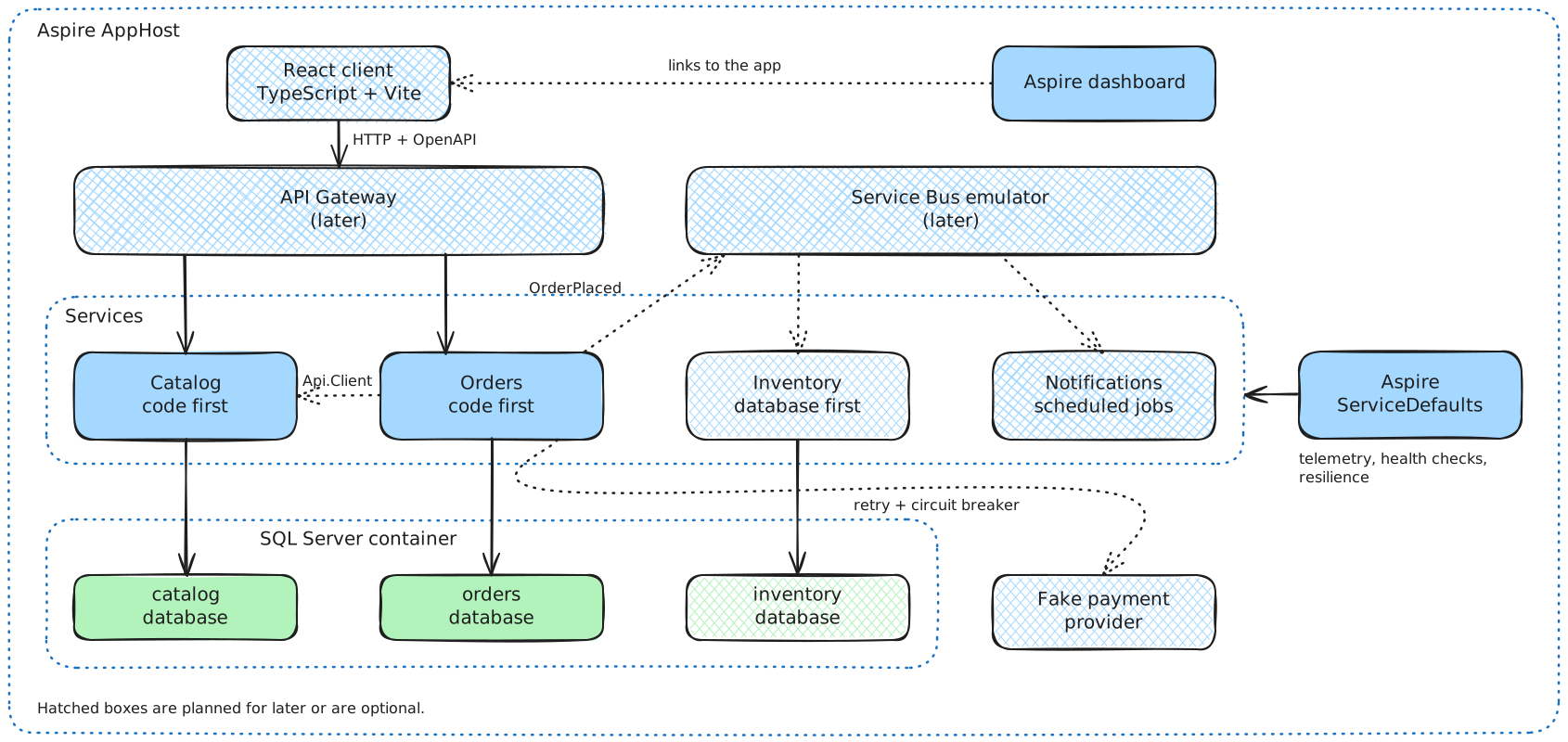
Hatched boxes are not built yet. Solid boxes are. The drawing and the status of every block are kept in sync with the code.
How the pieces fit
- Clients only talk to the API gateway. The gateway is planned. Until then you call the services directly.
- Services own their data. A service never reads the database of another service. Where one needs data of another, it asks through an interface. Orders asks Catalog for prices over HTTP when you run through Aspire. Stock and payment are still fakes.
- Contracts. Sharing the contracts of a service is a choice per connection. The React client and the price call from Orders to Catalog keep their own models. A later service to service call will share contracts, so the demo shows both. See Sharing contracts.
- Events between services will travel over the Service Bus. Inside a service, events stay in memory.
- Databases. Every service has its own SQL Server database.
- Aspire starts everything with one command: the services, SQL Server in a container and the dashboard. You can still start a service on its own.
How a request flows through a service
- An endpoint receives the HTTP request and turns it into a service request.
- The service request processor runs the decorators: logging, tracing and validation.
- A handler runs the use case. It reads through queries and changes data through commands.
- The result comes back as a response, either a value or a list of errors.
- The endpoint turns the response into an HTTP status code and a body.
Where the CAT modules sit
| Layer | Modules |
|---|---|
| API | Cat.Minimal.Api |
| Core service | Cat.ServiceRequests, Cat.Queries, Cat.Commands, Cat.Validators, Cat.Responses, and in Orders also Cat.FluentWorkflows and Cat.EventAggregators |
| Infrastructure | Cat.EFCore |
| Everywhere | Cat.Expressions |
The building blocks explain where each module is used and why.
How to run
The main route is the Aspire AppHost. One command starts Catalog, Orders and SQL Server, and opens the dashboard. You can also start one service on its own, see Run one service.
Prerequisites
- The .NET SDK that
global.jsonasks for. - Docker Desktop for the default route. SQL Server runs in a container.
- Or a SQL Server you already have, and no Docker. Temporal tables need SQL Server, so SQLite and PostgreSQL do not work.
Run with Aspire
- Clone the repository and open a terminal in its root folder.
- Start the AppHost:
dotnet run --project demo/Cat.Demo.AppHost/Cat.Demo.AppHost --launch-profile http - Wait until the dashboard shows
catalogandordersas running. The first start pulls the SQL Server image, about 1.5 GB, so it takes a few minutes. - Open the dashboard at
http://localhost:15101. It needs no login. It shows the logs, traces, metrics and health checks of both services. - Try the endpoints. Catalog runs on
http://localhost:5101and Orders onhttp://localhost:5102. Open these files in Visual Studio or Rider and run the requests from top to bottom. Later requests use ids from earlier responses.demo/Cat.Demo.CatalogService/Cat.Demo.CatalogService.Api/CatalogRequests.httpdemo/Cat.Demo.OrderService/Cat.Demo.OrderService.Api/OrderRequests.http
- Place an order and open its trace in the dashboard. It shows the call from Orders to Catalog for the prices.
- Press Ctrl+C to stop. The database lives in the Docker volume
cat-demo-sql-data, so the data is still there at the next start.
To start again with empty databases, stop the AppHost and remove the volume:
docker volume rm cat-demo-sql-data
SQL Server modes
The setting Sql:Mode of the AppHost picks where the databases live.
| Mode | What happens | Needs |
|---|---|---|
Container (default) |
The AppHost starts a SQL Server container with the data volume and creates the databases catalog and orders. The password is generated and kept in the user secrets. |
Docker |
Existing |
The AppHost passes the connection strings ConnectionStrings:catalog and ConnectionStrings:orders to the services. The defaults point to the local default instance. |
A SQL Server you can reach |
To use Existing, set the mode in the user secrets of the AppHost:
dotnet user-secrets set "Sql:Mode" "Existing" --project demo/Cat.Demo.AppHost/Cat.Demo.AppHost
To point it at another server, set ConnectionStrings:catalog and ConnectionStrings:orders in the same way. The defaults use Windows authentication, which works for a local process only.
Docker memory
Docker Desktop on Windows runs on WSL2. By default the WSL2 virtual machine can take half of your RAM and keeps it while it runs.
- Limit WSL2. Create
%UserProfile%\.wslconfig, then runwsl --shutdownand restart Docker Desktop. This is an example for a machine with 32 GB:[wsl2] memory=8GB processors=4 swap=2GB [experimental] autoMemoryReclaim=gradual sparseVhd=true - Use the WSL 2 backend in Docker Desktop, and turn off start at sign-in.
- SQL Server is capped. The AppHost sets
MSSQL_MEMORY_LIMIT_MBto 2048 on the container. An idle container uses about 620 MiB. - Give the memory back. When you are done, quit Docker Desktop and run
wsl --shutdown.
Run one service
Every service still starts on its own, with its own appsettings. It needs a SQL Server that you start yourself, and no Docker is involved. Without the AppHost, Orders uses a fake for prices.
- Start the Catalog service. First check the connection string in
demo/Cat.Demo.CatalogService/Cat.Demo.CatalogService.Api/appsettings.Development.json. The default points to the local default instance:Server=.;Database=catalog;Trusted_Connection=True;TrustServerCertificate=TrueThen run:
dotnet run --project demo/Cat.Demo.CatalogService/Cat.Demo.CatalogService.ApiOpen
http://localhost:5101. The OpenAPI document is athttp://localhost:5101/openapi/v1.json. - Start the Order service in a second terminal. It needs its own database. The Catalog service does not have to run. Check
demo/Cat.Demo.OrderService/Cat.Demo.OrderService.Api/appsettings.Development.json:Server=.;Database=orders;Trusted_Connection=True;TrustServerCertificate=TrueThen run:
dotnet run --project demo/Cat.Demo.OrderService/Cat.Demo.OrderService.ApiOpen
http://localhost:5102. - Use the
.httpfiles from the Aspire steps.
In Development both services apply their EF Core migrations at startup. Catalog adds 4 categories and 7 books when its tables are empty. Orders adds the three order statuses.
Things to know
- No login yet. The
X-Demo-Userheader picks the user:alice(the default),boboradmin. Alice and Bob only see their own orders. - Fakes for the other services. Stock and payment are fakes, because the real services are not built yet.
- Prices are real under the AppHost, because Orders asks Catalog. Without the AppHost the price of a book is made from its id, between 5.95 and 44.95 euro.
- A line of more than 50 copies is out of stock.
- A total above 500 euro is declined.
- Order numbers look like
20261105-0001. The counter restarts every UTC day. The development endpointPOST /development/scheduler/clean-up-order-countersremoves the counters of earlier days. The scheduler will do that every night.
Health checks
Both services answer /health (ready) and /alive (running) in every environment, with a plain Healthy or Unhealthy. The AppHost watches /health of both.
Things to know about the dashboard
The dashboard may say “No trusted development certificate was found”. That is harmless for now, because the AppHost, the dashboard and the services all run on HTTP. Anyone on your machine can open the dashboard on localhost, which is fine for a local demo.
Run the tests
Run all tests of the repository, including the demo tests:
dotnet cake --target=Test
Building blocks
One chapter for every box in the drawing. A database sits in the chapter of the service that owns it.
| Block | Status | What it is |
|---|---|---|
| React client | Planned | The web shop. |
| Aspire AppHost and dashboard | Built | Starts the whole system and shows how it runs. |
| API Gateway | Planned | The one door for clients. |
| Service Bus emulator | Planned | Messages between services. |
| Catalog service | Built | Books, categories and prices. |
| Orders service | Built | Placing and following orders. |
| Inventory service | Planned | Stock levels and reservations. |
| Notifications service | Planned | Messages to customers and scheduled jobs. |
| Aspire ServiceDefaults | Built | Shared telemetry, health checks and resilience. |
| Fake payment provider | Planned | A separate pretend payment service that can fail on purpose. |
React client
Status: Planned
What it is. A thin web client with a book list, a basket and an order overview. It uses React with TypeScript, built with Vite.
How it will work.
- It only talks to the API gateway.
- It logs in with OpenID Connect and sends the token with every call.
- It has no shared code with the services. The client comes from the OpenAPI documents of the services.
CAT modules.
| Module | Where | Why |
|---|---|---|
Cat.Minimal.Api |
Produces the OpenAPI documents the client is built from | One description of every endpoint and every possible response. |
Pros.
- The client stays independent of .NET. The services expose a normal HTTP API.
- React is the most widely known option.
Cons.
- No shared contracts, so a change in a service needs a refresh of the generated client.
- Blazor WebAssembly would share the contracts, but it makes the demo look .NET only.
More. Client section of the plan.
Aspire AppHost and dashboard
Status: Built
What it is. One project that describes the system: Catalog, Orders and SQL Server. The Aspire dashboard shows logs, traces, metrics and health checks. The React app, Keycloak and the Service Bus emulator join later.
How it works.
demo/Cat.Demo.AppHost/Cat.Demo.AppHostadds the Api project of each service. The services keep their ports, 5101 and 5102, with no Aspire proxy. The dashboard runs on 15101.- The setting
Sql:ModepicksContainer(the default) orExisting. See SQL Server modes. - In
Containermode the AppHost adds a SQL Server container with a named data volume and the databasescatalogandorders. The services wait for their database, and Orders waits for Catalog. - The services read
GetConnectionString("catalog")andGetConnectionString("orders")in both modes. They do not know which mode runs. - Orders gets the address of Catalog through service discovery. That switches on
CatalogPriceProvider. - Every service still starts on its own with
dotnet run. The AppHost is a convenience, not a requirement.
CAT modules. None. The AppHost is demo infrastructure. The modules never depend on Aspire.
Pros.
- One command to start everything.
- Traces across services in one place.
- A fresh clone needs no connection strings.
Cons.
- Docker Desktop eats memory. See Docker memory for the limits.
- The first start pulls a SQL Server image of about 1.5 GB.
- It is one more thing to learn.
More. demo/Cat.Demo.AppHost. DemoAspire.md.
API Gateway
Status: Planned
What it is. The one door for clients. It validates the token and forwards calls to the services.
CAT modules. Planned: Cat.Api.Gateway, a new module. See its plan.
Pros.
- Clients know one address.
- Security checks sit in one place.
Cons.
- One more hop, and one more thing to run.
More. Decisions in the plan.
Service Bus emulator
Status: Planned
What it is. The Azure Service Bus emulator, started by the AppHost. Services publish events such as OrderPlaced on it, and other services listen.
CAT modules. All planned.
| Module | Where | Why |
|---|---|---|
Cat.Messaging (future) |
Publishing and consuming | Same handler style as the other modules. |
Cat.EventProcessor (future) |
Inventory and Notifications | Turns incoming messages into service requests. |
Cat.Sagas (future) |
Orders | A workflow that waits for a message. |
Pros.
- Services do not need to know each other.
- A slow service does not block an order.
Cons.
- It runs in Docker.
- Failures are harder to follow than a direct call.
More. Messaging in the plan, Cat.Sagas.
Catalog service
Status: Built
What it is. Books, categories and prices. Mostly reads, with a small admin part. It is the first service of the demo and is built code first.
How it works.
- Endpoints, all under
/catalog:GET /bookssearches books.GET /books/{bookId}returns one book.GET /books/pricesreturns the price list, which Orders uses under the AppHost.POST /booksadds or changes a book.GET /categorieslists the categories.
- Each endpoint maps to a service request such as
BookSearchRequest. A handler turns it into queries and commands. - Entities are
Category,BookandBookPrice.BookPriceis a temporal table, so every old price stays in the history. - Saving a book checks that the ISBN is unique.
- The folder is
demo/Cat.Demo.CatalogService, with the projects of the service project structure.
Database. The catalog database is built. It is a SQL Server database that only Catalog reads. In Development the service applies its EF Core migrations at startup and adds 4 categories and 7 books when the tables are empty. Every entity inherits CatEntityBase, so each has a Guid Id as non-clustered primary key and an identity SequenceId that holds the clustered index. BookPrice inherits CatTemporalEntityBase. SQL Server keeps every old price in a history table, and ValidFrom and ValidUntil are the period columns. Names and columns are not final.
erDiagram
    Category ||--o{ Book : groups
    Book ||--o| BookPrice : "priced by"

    Category {
        Guid Id PK
        int SequenceId
        string Name
    }
    Book {
        Guid Id PK
        int SequenceId
        string Isbn UK
        Guid CategoryId FK
        string Title
        string Author
    }
    BookPrice {
        Guid Id PK
        int SequenceId
        Guid BookId FK
        decimal Amount
        datetime ValidFrom
        datetime ValidUntil
    }
CAT modules.
| Module | Where | Why |
|---|---|---|
Cat.ServiceRequests and its logging, tracing and validation decorators |
Core service, wired in the Api | One entry point per use case, with cross cutting work done once. |
Cat.Queries, Cat.Commands and their logging decorators |
Core service and Infrastructure | Reads and writes are separate handlers that are easy to test. |
Cat.Validators |
Core service | Rules for a book and for the price list request, with every problem returned at once. |
Cat.Responses |
Everywhere | A result is either a value or a list of errors. No exceptions for business failures. |
Cat.Minimal.Api |
Api | Maps service requests to endpoints and documents the responses. |
Cat.EFCore |
DataModels and Infrastructure | Entity base classes, and the temporal price table. |
Cat.Expressions |
Api | Compiled member access that is reused. |
Pros.
- Every use case has the same shape, so a new one is easy to add.
- The core service has no web or database code, so it is easy to unit test.
- Price history costs one base class.
Cons.
- Many small types for a small service: a request, a handler, a query, a query handler and a validator.
- Temporal tables tie the demo to SQL Server.
- Category names are plain text.
Cat.Localizationsis not used yet.
More. Code in demo/Cat.Demo.CatalogService. Requests in CatalogRequests.http. Data model.
Orders service
Status: Built
What it is. The main service. Customers place and track orders. Built code first.
How it works.
- Endpoints, all under
/orders:POST /places an order.GET /lists the orders of the user.GET /{orderId}returns one order.POST /{orderId}/cancelcancels an order.
- The place order process is a workflow, in
PlaceOrderWorkflow:- Find or create the customer from the current user.
- Look up the price of every line and add up the total.
- Create the order. It gets its number and the status
Pendingin one transaction. - Reserve the stock. If a book is out of stock, cancel the order and stop.
- Take the payment and save it. If it is declined, cancel the order and stop.
- Confirm the order.
- Confirmed and cancelled are events. Subscribers set the status, write an audit record and release the stock.
- Stock, price and payment sit behind interfaces:
IStockReservation,IPriceProviderandIPaymentProvider. Fakes answer for stock and payment. For prices,CatalogPriceProvidercallsGET /catalog/books/pricesover HTTP when the host gives Orders an address for Catalog, as the AppHost does. Without it,FakePriceProvideranswers. ICurrentUsertells the core service who is calling. A development stub reads theX-Demo-Userheader. Orders of other users come back as not found.- Order numbers come from a
DailyOrderCountertable, increased in one atomic statement in the same transaction that saves the order.
Database. The orders database is built. It is a SQL Server database that only Orders reads. In Development the service applies its EF Core migrations at startup and adds the three order statuses. All tables are regular entities that inherit CatEntityBase. OrderNumber is unique. OrderLine refers to a book with BookId and has no foreign key, because the book lives in the Catalog database. DailyOrderCounter has no relationship with the other tables. Names and columns are not final.
erDiagram
    Customer ||--o{ Order : places
    OrderStatus ||--o{ Order : describes
    Order ||--|{ OrderLine : contains
    Order ||--o| Payment : "paid by"

    Customer {
        Guid Id PK
        int SequenceId
        string ExternalId UK "sub claim of the token"
        string Name
        string Email
    }
    OrderStatus {
        Guid Id PK
        int SequenceId
        string Code
    }
    Order {
        Guid Id PK
        int SequenceId
        string OrderNumber UK
        Guid CustomerId FK
        Guid OrderStatusId FK
        datetime PlacedAt
        decimal Total
    }
    OrderLine {
        Guid Id PK
        int SequenceId
        Guid OrderId FK
        Guid BookId "Book in Catalog, no foreign key"
        int Quantity
        decimal UnitPrice
    }
    Payment {
        Guid Id PK
        int SequenceId
        Guid OrderId FK
        decimal Amount
        string Status
        datetime PaidAt
    }
    DailyOrderCounter {
        Guid Id PK
        int SequenceId
        datetime Date UK "UTC day"
        int LastNumber
    }
CAT modules.
| Module | Where | Why |
|---|---|---|
Cat.FluentWorkflows and its command step |
Core service | The place order process reads as a list of steps, with an if for out of stock and a foreach over the lines. |
Cat.EventAggregators |
Core service | In-process events. The workflow publishes, subscribers react, and neither knows the other. |
Cat.ServiceRequests, Cat.Queries, Cat.Commands, Cat.Validators, Cat.Responses |
Core service | The same use case shape as Catalog. |
Cat.Minimal.Api |
Api | Endpoints and OpenAPI. |
Cat.EFCore |
DataModels and Infrastructure | Entities with Guid ids and sequence ids. |
Cat.Expressions |
Api | Compiled member access. |
Pros.
- The business process is one readable class.
- Events keep the status update, audit and cleanup out of the workflow.
- Interfaces with fakes let the demo run without the other services.
Cons.
- Events cannot drive the process. They return no answer, and a failing subscriber throws. Calls that decide the next step go through interfaces instead.
- Subscribers live as long as the app, because the aggregator holds them with weak references. A subscriber that needs the
DbContextopens its own scope. - A cancelled order keeps its approved payment, because there is no refund step yet.
- The state lives in the order status. A payment over messages needs
Cat.Sagas.
More. Code in demo/Cat.Demo.OrderService. Requests in OrderRequests.http. Data model, events and interfaces, known gaps.
Inventory service
Status: Planned
What it is. Tracks stock and reserves it when an order comes in. It is built database first, with SQL scripts that the AppHost runs.
How it will work.
- It identifies a book by
Isbnand an order byOrderNumber, because it does not share a database with the other services. - It replaces
FakeStockReservation. - It listens to
OrderPlaced.
Database. The inventory database is planned. Inventory is the database first service. A stock database often exists already, owned by a warehouse team, so the schema comes from SQL scripts and not from C# classes. The AppHost creates the database and runs the scripts on startup. The entities are scaffolded with dotnet ef dbcontext scaffold, and nobody edits the generated files. They do not inherit CatEntityBase and have no SequenceId. Names and columns are not final.
erDiagram
    Warehouse ||--o{ StockItem : holds
    StockItem ||--o{ StockReservation : "reserved by"

    Warehouse {
        int Id PK
        string Name
        string Location
    }
    StockItem {
        int Id PK
        int WarehouseId FK
        string Isbn
        int QuantityOnHand
    }
    StockReservation {
        int Id PK
        int StockItemId FK
        string OrderNumber
        int Quantity
        datetime ReservedAt
    }
CAT modules. Planned: Cat.Messaging and Cat.EventProcessor to listen, and the usual service request modules. The plan describes how the database first approach fits the toolkit.
Pros. Shows that CAT also works when the database comes first.
Cons. Two ways to build a service means two ways to explain.
More. Inventory data model.
Notifications service
Status: Planned
What it is. Sends the order confirmed and order shipped messages. It also runs scheduled jobs, such as the nightly clean up of order counters and cancelling unpaid orders.
CAT modules. Planned: Cat.Scheduling, Cat.EventProcessor and Cat.Localizations for texts in several languages.
Pros. A natural place for scheduled work and for the localization module.
Cons. Not decided yet where it stores its data.
More. Services in the plan.
Aspire ServiceDefaults
Status: Built
What it is. A shared project with the defaults every service uses. Only the demo uses it. The CAT modules never reference it.
How it works. AddServiceDefaults() in the Program.cs of a service sets up:
- Logs, metrics and traces with OpenTelemetry. The wildcard source
Cat.*covers the CAT decorators and workflows. Data leaves the process only whenOTEL_EXPORTER_OTLP_ENDPOINTis set, which the AppHost does. - A readiness check at
/healthand a liveness check at/alive. - Service discovery and the standard resilience handler on every
HttpClient: retries, timeouts and a circuit breaker.
CAT modules. None are referenced. It works next to them: the tracing decorator of Cat.ServiceRequests shows up in the traces.
Pros.
- Every service gets the same setup in one line.
- It shows that CAT sits next to the standard .NET tools.
Cons.
- The demo uses Aspire, so it does not use the future
Cat.TelemetryandCat.Resiliencemodules. - The health checks only say that the process runs. They check no database yet.
More. Plan.
Fake payment provider
Status: Planned
What it is. A small separate service, Cat.Demo.PaymentService, that pretends to be a payment provider. Orders calls it over HTTP. It has no database.
Today. FakePaymentProvider runs inside the Orders service behind IPaymentProvider. It approves every amount up to 500 euro and declines the rest. An approved payment gets a fake reference. The TakePaymentStep of the place order workflow calls it. This is why the box is hatched: a call inside the process never times out or fails, so there is nothing for retry and circuit breaker to do.
How it will work.
- The service takes payments by the same rules as the fake of today.
- A setting of the service can make it fail on purpose, for example slow or not answering. Which failures are possible is still open.
- Orders gets a client for it behind the same
IPaymentProvider. Without the AppHost,FakePaymentProviderkeeps answering, the wayFakePriceProviderdoes for prices. - The AppHost starts the service.
CAT modules.
| Module | Where | Why |
|---|---|---|
Cat.FluentWorkflows |
The step that calls it | The workflow only knows the interface. |
Cat.Resilience (future) |
Around the client in Orders | Retry and circuit breaker on a call that can really fail. |
Pros.
- Retry and circuit breaker have a real call to protect, and you can switch the failures on in a demo.
- The demo shows a call to a service that does not behave.
Cons.
- One more project to build and run.
- A retried payment call may charge twice, so the call needs an idempotency key.
- The service is still pretend. It proves nothing about a real provider.
More. Code of today: demo/Cat.Demo.OrderService/Cat.Demo.OrderService.Infrastructure/Fakes/FakePaymentProvider.cs. Payment provider decision and open questions, Cat.Resilience.